
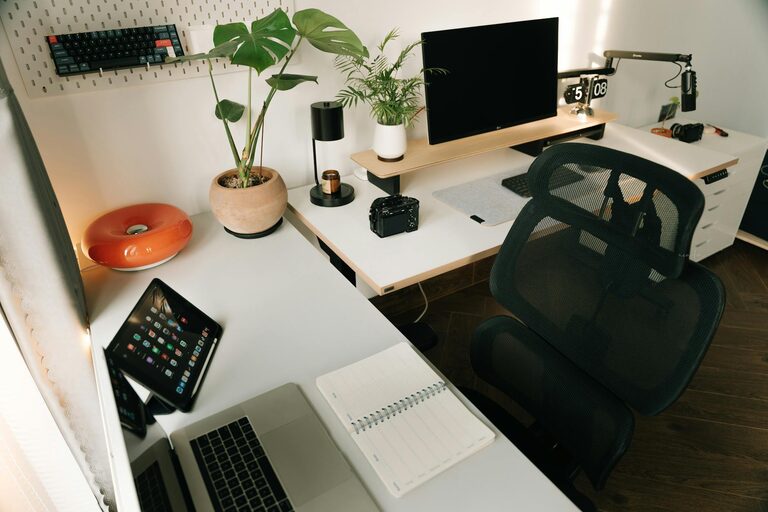
Creating an efficient and comfortable home workspace is essential, especially as more people work remotely or spend long hours at their desks. A well-organised workspace not only helps you focus but also makes the workday more enjoyable. In this post, we’ll explore creative and practical ways to organise your home workspace, helping you boost productivity and comfort.
1. Choose the Right Location
Before organising, start with a good location:
– Natural Light: Pick a spot near a window if possible. Natural light improves mood and reduces eye strain.
– Quiet Corner: Find a quiet, low-traffic area to minimise distractions.
– Space Considerations: Ensure there’s enough room for your computer, notes, and any tools you regularly use.
2. Declutter for Clarity
A cluttered desk leads to a cluttered mind. Here are steps to keep your workspace tidy:
– Clear Surfaces: Remove unnecessary items from your desk surface.
– Use Storage Boxes: Small boxes or baskets can hold stationery, cables, or documents.
– Digital Declutter: Organise digital files and delete old emails to keep your workflow smooth.
3. Smart Storage Solutions
Creative storage helps keep things organised and accessible:
Vertical Storage
Use wall-mounted shelves or pegboards to free up desk space. These can hold books, plants, or office supplies neatly.
Drawer Organisers
Use dividers or small containers inside drawers to separate items like pens, paper clips, and sticky notes.
Multifunctional Furniture
Choose desks or cabinets with built-in storage to save room and reduce clutter.
4. Personalise Your Workspace
Adding personal touches makes your space inviting:
– Inspiring Artwork: Hang posters or photos that motivate you.
– Plants: Indoor plants improve air quality and add a touch of nature.
– Comfort Items: A cushion for your chair or a warm throw can boost comfort.
5. Cable Management
Messy cables can be distracting and frustrating. Try these tips:
– Cable Clips: Attach them along the edges of your desk.
– Cable Boxes: Hide power strips and excess wires inside these boxes.
– Wireless Accessories: Consider wireless keyboard and mouse setups to reduce cables.
6. Ergonomics Matter
Comfort directly impacts productivity. Here’s how to create an ergonomic workspace:
– Chair Height: Adjust so your feet rest flat on the floor and knees are at 90 degrees.
– Monitor Position: The top of your screen should be at eye level.
– Keyboard and Mouse: Keep them within comfortable reach, ideally on the same surface.
7. Efficient Lighting
Good lighting reduces eye strain and fatigue:
– Task Lighting: Use an adjustable desk lamp for focused work.
– Avoid Glare: Position screens away from direct light sources.
– Warm Bulbs: Choose lighting with warm tones for a cosy atmosphere.
8. Incorporate Zones for Different Tasks
If space allows, create separate zones within your workspace:
– Work Zone: Desk and computer for focused tasks.
– Creative Zone: Space for brainstorming, sketching, or reading.
– Relaxation Zone: A small chair or cushion to take breaks.
9. Use Labels and Colour Coding
Labels help locate supplies quickly, while colour coding can:
– Distinguish different types of documents or projects.
– Assign colours for different priorities or deadlines.
10. Regularly Refresh Your Setup
Organising your workspace isn’t a one-time task:
– Set a weekly or monthly routine to tidy, declutter, and reorganise.
– Adjust based on what’s working and what’s not to stay productive.
—
Organising your home workspace creatively can make a huge difference to your daily work experience. With thoughtful choices in layout, storage, décor, and ergonomics, you’ll create a space that’s both comfortable and productive. Start small, try different ideas, and find a setup that works perfectly for you. Happy organising!