
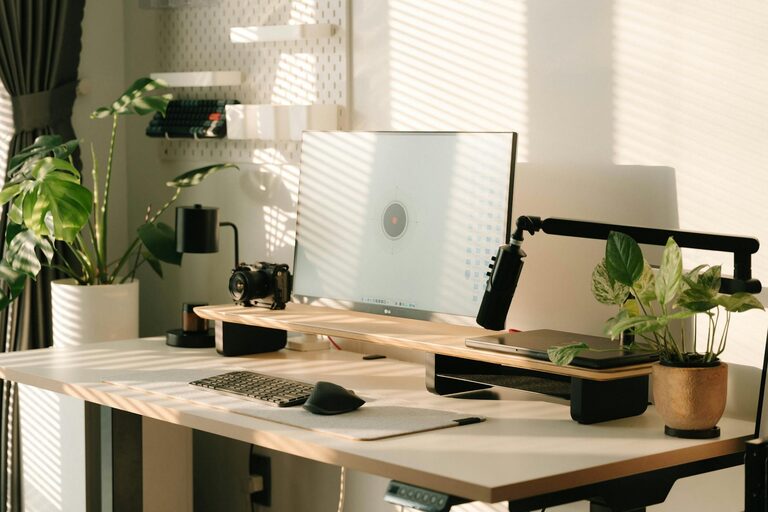
Creating a home office that blends comfort and productivity is essential for anyone working remotely or managing tasks from home. A well-designed workspace can help you stay focused, motivated, and comfortable throughout the day. Whether you have a dedicated room or a small corner in your living space, these practical tips will help you optimise your home office for success.
Choose the Right Location
Selecting the perfect spot for your home office is the first step. Ideally, this should be a quiet area with minimal distractions, good natural light, and enough space for your needs.
– Quiet and Private: Look for a space where you can work without interruptions from family or housemates.
– Natural Light: Set up near a window if possible to benefit from daylight, which improves mood and reduces eye strain.
– Away from Noise: Avoid busy areas like kitchens or living rooms where noise levels tend to be higher.
If space is limited, even a well-organised desk in a corner can work well.
Invest in Ergonomic Furniture
Comfort is vital when you spend hours working at a desk. Ergonomic furniture supports your posture and reduces the risk of discomfort or injury.
– Adjustable Chair: Choose a chair with good lumbar support, adjustable height, and comfortable cushioning.
– Desk Height: Your desk should allow your elbows to be at roughly 90 degrees when typing.
– Footrest: If your feet don’t rest flat on the floor, use a footrest to reduce pressure on your legs.
Remember, small adjustments can make a big difference in how you feel at the end of the day.
Organise Your Desk Efficiently
A clutter-free desk helps maintain focus and keeps essential items within easy reach.
– Declutter Regularly: Remove unnecessary papers and items daily.
– Use Storage Solutions: Desk organisers, drawers, and shelves can keep supplies tidy.
– Keep Equipment Handy: Place frequently used items like your keyboard, mouse, and notepad where you can easily access them.
By maintaining order, you create a more inviting and functional workspace.
Optimise Lighting
Proper lighting reduces eye strain and helps keep you alert.
– Natural Light First: Position your desk near a window but avoid glare on your screen.
– Task Lighting: Use a desk lamp with adjustable brightness for focused work in darker conditions.
– Avoid Harsh Overhead Lights: Too much bright overhead lighting can cause discomfort.
Adjust lights to create a comfortable environment depending on the time of day and tasks.
Incorporate Personal Touches
Adding elements that make you feel good can increase your satisfaction and motivation.
– Plants: Introducing greenery can improve air quality and add calmness.
– Artwork or Photos: Choose images that inspire or relax you.
– Comfort Items: A soft cushion, a favourite mug, or a small toy can personalise the space without causing distraction.
Balance professionalism with personality to create a space you’ll enjoy working in.
Manage Cables and Technology
A tidy appearance and reliable technology contribute to efficiency.
– Cable Management: Use clips, sleeves, or ties to keep cables organised and out of sight.
– Quality Equipment: Invest in reliable internet, a good monitor, and noise-cancelling headphones if needed.
– Backup Solutions: Ensure you have backups of important files and software tools updated for smooth operation.
Keeping technology organised helps prevent frustration and downtime.
Set Boundaries and Routine
Your environment can support your work habits and help separate work from personal life.
– Dedicated Work Hours: Establish and stick to regular hours to help maintain a work-life balance.
– Break Area: If space allows, designate a separate area for breaks to step away from your desk.
– Clear Signals: Use a door sign or signals to let others know when you’re working.
A structured routine enhances productivity and helps you switch off after work.
Maintain Good Air Quality and Temperature
A comfortable temperature and fresh air can improve concentration.
– Ventilation: Open windows regularly to allow fresh air in.
– Heating and Cooling: Use fans, heaters, or air conditioning to maintain a comfortable temperature all year round.
– Air-Purifying Plants: Certain plants can help filter indoor air naturally.
Maintaining good air quality supports both your health and productivity.
Minimise Distractions
Reducing interruptions helps you focus better.
– Turn Off Notifications: Limit alerts on your phone or computer during work periods.
– Use Noise Control: Use headphones or white noise apps to block out distracting sounds.
– Organise Workspace Layout: Facing away from busy areas or windows with a lot of movement can reduce distraction.
Creating a calm, controlled environment encourages sustained focus.
—
Designing a comfortable and productive home office is achievable with some thoughtful planning. By paying attention to location, ergonomics, lighting, organisation, and personal touches, you can create a space that supports both your wellbeing and work goals. Remember, the key is to make the space work for you—not the other way around. Happy working!